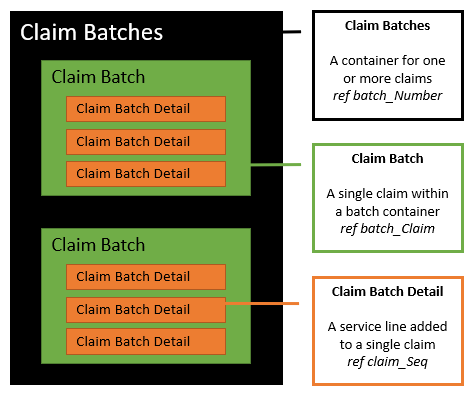
This short guide walks you through the essential steps for creating a claim using VBAPI.
You can optionally group claim data into batches, then create the claim header, and finally add one or more service-line details.
If you want to organize multiple claims together, start by creating a batch container.
Use Create Claim Batches:POST /claim-batches
This gives you a batch ID that subsequent claim records can be associated with.
Next, create the core claim record that holds the header-level data.
Use Create Claim Batch:POST /claim-batch
This establishes the claim shell (member, dates, provider, etc.) that your service lines will attach to.
Finally, include one or more service-line entries that make up the details of the claim.
Use Create Claim Batch Detail:POST /claim-batch-detail
Each call creates a service line tied to the claim header.
Below is a visual reference of how batch → claim → details relate: